Skip to content

Product

Skalable Matrix: one place where your systems talk to each other

You run your business on many systems, and they all need to talk to each other. Matrix connects Dynamics 365, Business Central, NetSuite, Salesforce, your banks and the files and databases around them, maps and checks the data on the way, and keeps every run on the record. It was built from real client integrations in finance and operations, and your data stays in your domain.

Skalable MatrixYour ERP · Dynamics 365, Business Central or NetSuite

Salesforce ↔ your ERP

New customers and orders arrive in Dynamics 365 without re-keying, with values looked up and totals checked on the way.

Every job has run history and alerts. Exact connections are confirmed when we scope your integration.

Works with

  • Dynamics 365 Finance & Operations
  • Business Central
  • NetSuite
  • Salesforce
  • Banks (BAI2, SFTP)
  • SQL databases
  • Files and email

The problem

Every connection is different, and every one needs looking after

Each connection arrives in its own format: CSV, BAI2, XML, Excel, fixed-width, JSON, a PDF by email. And each one fails in its own way: an overnight file fails, a password expires, duplicate records appear, and nobody remembers the rule. So far there have been three ways to cope:

  • Custom scripts, written one at a time: quick to start, but they break when anything changes and the knowledge sits with one developer.
  • General-purpose platforms such as Boomi, MuleSoft or SnapLogic: powerful and built to connect anything, but you still need specialists to build and maintain every flow.
  • Spreadsheets and re-keying: someone exports, reformats and types it in again. Slow, and errors slip through.

See it working

Skalable Matrix in 75 seconds

1:15 · music · sample data on screen · no sign-up · Open full size (opens a new tab)

Why every connection is different, the usual answers, and how Matrix connects, maps and logs your systems, with three examples from client work. Use the chapters to jump to a part.

How it fits together

Your systems in, checked data out, every run on the record

From

  • SalesforceCustomers and orders
  • BanksBAI2 statements
  • Expense and partner filesCSV, Excel, XML, JSON
  • Homegrown systemsSQL, files, email

Skalable Matrix

  1. ConnectAPIs, SQL, files, email, FTP/SFTP
  2. MapSource fields to target fields
  3. TransformExpressions, lookups, filters
  4. ValidateChecked before anything posts
  5. ScheduleOn a timetable or on demand

To

  • Your ERPDynamics 365 Finance & Operations, Business Central or NetSuite
  • BanksPayment files by SFTP

Log: every run, on the record

Sample rows for illustration

  • Salesforce orders → Dynamics 36506:00Completed
  • Bank statement (BAI2) → Dynamics 36507:30Completed
  • Payment file → bank SFTP16:00Held for review · alert sent

Most connections work in either direction. The exact systems, records and directions are confirmed when we scope your integration, and your data stays in your domain.

What you get

What is included

Connect
Dynamics 365 Finance & Operations, Business Central, NetSuite, Salesforce, SQL databases, files, email and FTP, SFTP or FTPS. We confirm the records and directions for your systems when we scope.
Map
Each source field is mapped to its place in the target, set up once per integration and visible to your team.
Transform
Expressions, lookups and filters turn each format into what the target expects, from CSV, Excel, XML and JSON to BAI2 and fixed-width files.
Validate
Data is checked before anything posts, and rows that fail are held for review with an alert.
Schedule
Inbound and outbound tasks run on a schedule in your time zone, or on demand from a file upload.
Log
Every run is recorded with its time, records and status, and email alerts flag failures. Failures are flagged, not hidden.

Built from client work

Three examples of what Matrix runs

The same three workflows appear in the film. Each new integration is scoped against your own systems.

Salesforce to Dynamics 365

  • New customers and orders arrive in the ERP without re-keying
  • Values are looked up and mapped on the way, and order totals are checked

Banks, both directions

  • Bank statements (BAI2) in, transformed and loaded into Dynamics 365
  • Payment files out to the bank by SFTP, on schedule

Homegrown and specialist systems

  • Files from expense, property and operations systems loaded into Dynamics 365
  • Ledger, income and vendor invoice journals, checked before anything posts

Workflows from Skalable client integrations. All names, amounts and counts in the film are sample data.

Run with confidence

Every run, on the record

Integrations fail in ordinary ways: a credential expires, a file arrives late or a record is missing data. This is what happens next today.

What is recorded

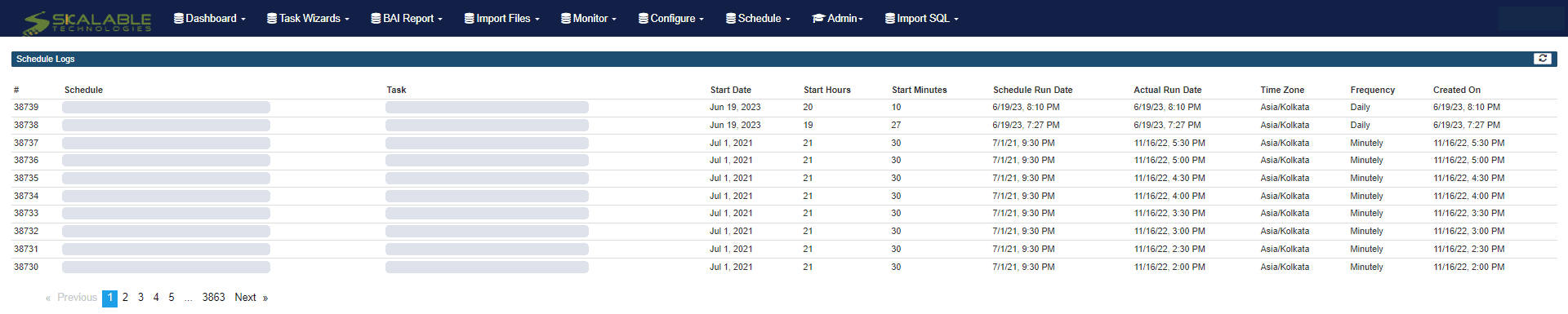
  • The planned and actual run time of every scheduled job
  • Errors against the run that failed, in the task log
  • Run history that support can review

Who is alerted

  • Email alerts go to the recipients agreed for that integration at setup
  • Under managed support, response follows the severity targets in your agreement

How recovery works

  • The data, credential or connection is corrected
  • The failed job is reprocessed and its result checked in the target system

This is how Matrix runs today: task logs, email alerts and manual reprocessing. Automated retry queues, replay and tracing belong to the next platform version, which is in design review, and are not claimed here.

Matrix schedule log listing jobs with their schedule, start time, planned and actual run dates, time zone and frequency
The Matrix schedule log: planned and actual run times for each job. Archived screenshot, June 2023; schedule, task and user names hidden.

Your data, your choice

Connect what works, without handing over your data

Your data stays in your domain

  • Matrix moves data between your systems
  • Access is agreed per integration when we set it up

Proprietary, not a lock-in

  • Your integration tasks can be exported
  • And reused for the next integration

Proof

Results from a customer like you

All case studies

Matrix was one part of this customer’s program, alongside Dynamics 365, Skalable Stream and Power BI. The results below belong to the whole program, not to Matrix alone.

Fitness & Wellness · Microsoft Dynamics 365 · Skalable Stream

≈ 75%

less time to process invoices, an estimated 3,000 hours a year

Leading health and fitness franchise (name withheld)

Stream accelerates efficiency and improves accuracy for a leading health and fitness franchise

A franchise that had grown from a single studio to 49 locations in multiple states was hand-keying 600 invoices a week with two full-time staff and had outgrown QuickBooks. Skalable replaced QuickBooks with Microsoft Dynamics 365, added Power BI and Matrix, and put Stream at the center of accounts payable with two-way integration to the ERP.

of vendors identified automatically in 2024, from 0% in 2022
96%
to prepare board reporting, down from a week
1 day
Read the case study (PDF)

How it works

From first conversation to a monitored integration

  1. Scope

    Source, target, records and transformation rules agreed, with a fixed setup fee per integration.

  2. Build and test

    The integration is configured and tested against your sandbox with real sample data.

  3. Run

    Go live on schedule, with every run logged and alerts to the people you choose.

FAQ

Common questions

Which systems does Matrix connect?

Matrix connects Dynamics 365 Finance & Operations, Business Central, NetSuite, Salesforce, SQL databases, files, email and FTP, SFTP or FTPS, including BAI2 bank files. Coverage varies by integration, so we confirm the exact records and directions for your systems when we scope the work.

How is Matrix different from Boomi or MuleSoft?

General-purpose platforms are built to connect anything, and you still need specialists to build and maintain every flow. Matrix was built from client integrations in finance and operations, and Skalable sets up, runs and supports each integration with your team.

Where does our data live?

In your domain. Matrix moves data between your systems, and access is agreed for each integration when we set it up.

Are we locked in?

No. Your integration tasks can be exported and reused.

How is Matrix priced?

A fixed setup fee per integration, based on source, target and transformation complexity, plus a monthly platform fee. Request an estimate on the pricing page.

What should work better next?

Tell us about the process, the bottleneck or the system behind it. A specialist replies within one business day with a practical first step.