Skalable AI · Finance
In productionBank reconciliation that proposes the match and shows its work
Bank Reconciliation AI reads your bank statements, finds the matching Dynamics 365 transactions and proposes each reconciliation with a confidence rating. Rules do the heavy filtering, AI is used only when several candidates compete, and your team accepts or rejects every proposal inside Dynamics 365.
Built for
- Controllers and accounting managers
- Finance teams reconciling many bank accounts across legal entities
- Organizations running Dynamics 365 Finance & Operations
Works with
- Dynamics 365 Finance & Operations
- Bank statements delivered by SFTP
- Multiple legal entities and bank accounts
Availability
In productionRunning today for a multi-entity finance team on Dynamics 365.
The problem
Matching is mechanical. Deciding should not be.
Most of the reconciliation effort goes into finding which ledger transaction belongs to which statement line, across every account and entity, every period. Bank Reconciliation AI does the finding and leaves the deciding to your team.
- Statement lines matched to Dynamics 365 transactions, one-to-one or one-to-many
- Each proposal rated High, Medium or Low confidence so reviewers know where to look
- Unmatched items grouped by company, bank account and statement type
See it working
Skalable AI for Bank Reconciliation, live with Dynamics 365
1:39, narrated, with captions · Microsoft demo data · no sign-up · Open full size (opens a new tab)
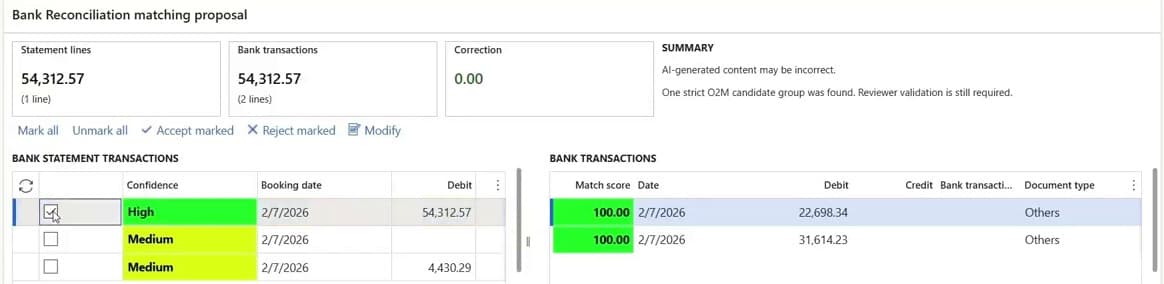
A statement is imported and matched automatically. Each proposal shows its evidence: a deposit matched to two transactions, a line with no confident match flagged for review. Your team then accepts, rejects or modifies the proposals in the Dynamics 365 bank reconciliation worksheet, and corrections become reviewed matching rules.
6.5 hrs → under 30 min
for a bank reconciliation process, reported by a multi-entity finance team running Bank Reconciliation AI on Dynamics 365 Finance & Operations.
Customer-reported result, not an independent study. Your results depend on your data, volumes and configuration. What was timed
- See a live demo
A working session on Dynamics 365. We reply within one business day with times.
- Watch every walkthrough
Work email; we send a one-click access link.
Try it
Reconcile five bank lines yourself
Run the matching, read the evidence for each proposal, then accept or reject it. This is how your team works in the Dynamics 365 worksheet, with sample data.
ACH · Harbor Linen
Oct 02 · 4,812.50
Not matched yet
Card batch 1182
Oct 02 · 12,930.40
Not matched yet
Wire · Northwind Supply
Oct 03 · 18,450.00
Not matched yet
ACH · Coastal Utilities
Oct 03 · 2,146.19
Not matched yet
Check · Pioneer Freight
Oct 04 · 7,300.00
Not matched yet
Five lines from a bank statement. Run the matching, then decide on each proposal.
Decision log
Every proposal, accept and reject is recorded here.
What you get
What is included
- Match proposals with confidence
- Every proposed match carries a High, Medium or Low confidence rating, so reviewers can clear the obvious quickly and spend their time on the rest.
- One-to-one and one-to-many
- Handles a single statement line against a single transaction, and one line settling several transactions.
- Rules first, AI second
- Candidates are filtered by debit or credit, currency, amount, bank account, legal entity and transaction category before any AI is involved.
- Unmatched analysis
- A dashboard of what did not match, filterable by company, bank account and statement type.
- Match evaluation before go-live
- Test a configuration change against real data and compare the results before it reaches production.
- Logs and self-service settings
- Processing logs for every run, and a settings page so your team can adjust configuration without a ticket.
Getting started
What you need, who does what, and how you judge it
- Prerequisites
- Dynamics 365 Finance & Operations
- Bank statements delivered to an SFTP folder
- The bank accounts and legal entities in scope
- Setup
- Skalable sets up statement import and the matching configuration for your accounts and entities
- Your team decides who accepts proposed matches in Dynamics 365
- Evaluation
- A demo on a Dynamics 365 environment
- Match evaluation on your own statement data before anything goes live
- Ongoing support
- A subscription sized to your statement volume
- Support and configuration changes from the Skalable team, as set out in your quote
Results
What one finance team reported
A multi-entity finance team running Bank Reconciliation AI on Dynamics 365 Finance & Operations reports that a bank reconciliation process that took about 6.5 hours now takes under 30 minutes.
What we can share here
- In production on Dynamics 365 Finance & Operations since 2026
- Multiple legal entities and more than 40 bank accounts
- The time figure is the customer’s own report of their process
- Every match is still accepted or rejected by the customer’s team
What we walk through with you
- The baseline process and the exact task that was timed
- Whether the new time includes review and exception handling
- How match coverage and acceptance are measured
- A reference conversation, where the customer agrees to one
The customer is not named on this site. The figure is a customer-reported result, not an independent study, and your results will depend on your data, volumes and configuration.
Dynamics 365 and Skalable
Dynamics 365 already matches bank transactions. Here is what this adds.
Dynamics 365 Finance includes rule-based bank reconciliation, and Business Central has its own reconciliation assistance. Bank Reconciliation AI is built for Dynamics 365 Finance & Operations and works with the reconciliation you already have.
Already in Dynamics 365 Finance
- Bank statement import and reconciliation worksheets
- Configurable matching rules, including one-to-many matches
- Manual matching and reconciliation in the standard screens
What Bank Reconciliation AI adds
- Statements picked up from SFTP, uploaded, validated and converted automatically
- AI evaluation only when several candidates compete, with its reasoning logged
- A High, Medium or Low confidence rating on every proposal
- Unmatched analysis by company, bank account and statement type
- Match evaluation: test a configuration change on real data before go-live
The fair test is your own data. Ask us to compare proposals on your statements against your current Dynamics 365 setup during evaluation.
How it works
From bank file to accepted reconciliation
Statements arrive
Bank statements dropped into an SFTP folder are uploaded to Dynamics 365, validated and converted automatically.
Rules narrow the field
Deterministic filters on amount, currency, direction, account, entity and category find the candidate transactions.
AI weighs close calls
Only when several candidates compete does the model evaluate them, and its scoring and reasoning are logged.
Your team decides
Validated proposals appear in Dynamics 365 with a confidence rating. Accepted proposals complete the reconciliation; rejected ones stay with your team.
Controls and governance
Built so the auditor’s questions have answers
The design choice that matters most: rules find the candidates, AI only breaks ties, and a person makes every decision.
- A person accepts or rejects every proposal in Dynamics 365
- Deterministic validation runs before any proposal is shown
- Model scoring, reasoning and audit logs are retained
- Dynamics 365 stays the system of record for the reconciliation
FAQ
Common questions
Does it reconcile anything without approval?
No. Every match is a proposal. Reconciliation completes in Dynamics 365 only after a person on your team accepts it.
Which ERP does it work with?
Dynamics 365 Finance & Operations. The agent works with your existing bank accounts, legal entities and statement formats.
How do bank statements get in?
Statements are placed in an SFTP folder and uploaded to Dynamics 365 automatically, where they are validated and converted before matching starts.
How do we know it will work on our data?
Match evaluation lets you run a configuration against real statement data and review the proposals before anything goes live. We also demo on a Dynamics 365 environment first.
How is it priced?
As a subscription sized to your statement volume. You receive a written quote after a demo and a short scoping call on your accounts and entities.
See Bank Reconciliation AI on Dynamics 365
A working session on a Dynamics 365 environment, your questions answered as we go, and a written next step within one business day.