Reinvent a process with AI
Where AI pays back, across your business
Work we have built with clients in finance, controls, legal and property operations: what it does, where the return comes from, who stays in charge and its current status.
Have a workflow in mind? Describe it and a specialist will reply →
What the status labels mean
- In production
- Running for a customer today
- In use by customers
- A product customers run today
- Demonstrated on client data
- Working feature shown on a client’s own data
- Built for a client
- Custom build, delivered and demonstrated
- Early access
- Available to selected customers
- Used by a client
- Built for a client and used by their team
- Proof of concept
- Built with a client against signed-off requirements
- Available for demo
- Working product, shown on a demo environment
Finance and accounting
Invoices, bank matching and posting to the books
- Multi-entity finance teamIn production
Bank reconciliation matching
Checks every bank transaction against your books and suggests the match, so your team reviews instead of hunting.
- Where the return comes from
- Hours of manual matching at every close, across many bank accounts.
- The problem
- Statement lines matched to ledger entries by hand across many bank accounts and entities.
- What the AI does
- Proposes matches, including one-to-many, with a confidence rating, and flags the lines it cannot match.
- Who stays in charge
- Your team accepts, rejects or changes each proposal in the Dynamics 365 bank reconciliation worksheet.
- Runs on
- Dynamics 365 Finance & Operations
6.5 hrs → < 30 min
for a bank reconciliation process
Source: Reported by the customer’s finance team
- FitnessIn use by customers
Invoice capture, coding and approval
Reads supplier invoices as they arrive, fills in the details and sends them for approval, instead of someone typing them in.
- Where the return comes from
- Time spent keying, coding and chasing approval for every invoice.
- The problem
- Invoices keyed from email and PDF, coded by hand and chased for approval.
- What the AI does
- Reads invoices from mailboxes, portal uploads and scanned PDFs, recognizes the vendor, codes lines from your history and matches to purchase orders and receipts.
- Who stays in charge
- Exceptions come to people, and approvals follow your routes before anything posts.
- Runs on
- Skalable Stream, posting to Dynamics 365 or NetSuite
≈ 75%
less time to process invoices, an estimated 3,000 hours a year, for a 49-studio fitness franchise
Source: Skalable Stream fitness franchise case study
- Property management · USA PropertiesDemonstrated on client data · April 2026
Invoice line coding recommendations
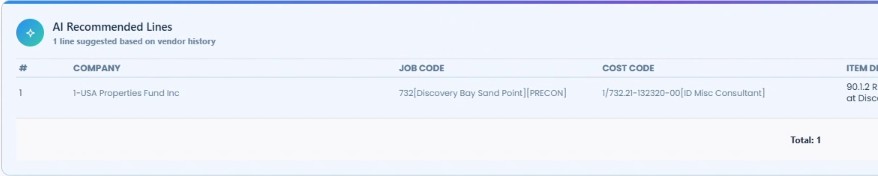
Suggests which property, job and cost code each invoice line belongs to, based on how that supplier was coded before.
- Where the return comes from
- Time spent looking up job and cost codes for each invoice line.
- The problem
- AP reviewers look up the company, job and cost code for every line of every invoice.
- What the AI does
- Recommends company, job and cost code for each line from the vendor’s history and shows the suggestion next to the invoice.
- Who stays in charge
- The AP reviewer applies the recommended lines, or edits them, before the invoice moves on.
- Runs on
- Skalable Stream
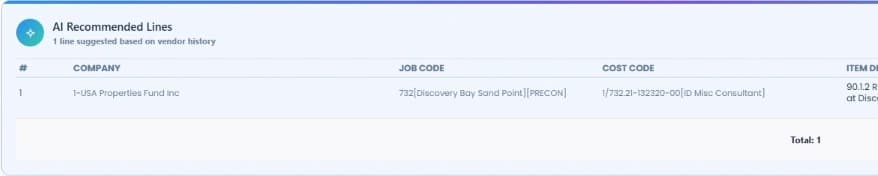
Stream suggests the company, job and cost code from vendor history (USA Properties data, sandbox, April 2026). - Agriculture (feedlot)Built for a client · 2026
Supplier statements into Business Central
Turns long PDF statements into individual invoices, checks them against your rules and sends clean ones straight to the books.
- Where the return comes from
- Keying statement data by hand; clean statements post without anyone touching them.
- The problem
- Supplier statements arrive as PDFs holding many invoices, each needing lot numbers, vendors and amounts entered in Business Central.
- What the AI does
- Splits each statement into invoices, reads the details including lot numbers, checks them against your rules and sorts them into Ready, Warning and Blocked.
- Who stays in charge
- Reviewers fix or reject anything flagged, and roles control who can post. Every statement keeps an audit trail.
- Runs on
- Dynamics 365 Business Central
Risk and controls
Spotting risky changes before money goes out
- Finance and audit teamsEarly access
Continuous control monitoring
Watches for risky changes, such as a supplier’s bank details being edited before a payment, and raises them for review.
- Where the return comes from
- Catching control problems when they happen, not months later in the audit.
- The problem
- Controls such as vendor bank changes, duplicate invoices and segregation of duties tested by sampling, after the fact.
- What the AI does
- Runs monitoring rules on Dynamics 365 data and opens a case with the evidence when one is breached.
- Who stays in charge
- The control owner reviews each case and decides the action, such as placing a vendor on hold.
- Runs on
- Dynamics 365 Finance & Operations
Legal and documents
Reading, sorting, comparing and drafting documents
- Legal · Tempus Law AssociatesUsed by a client · 2025
Legal document workspace on SharePoint
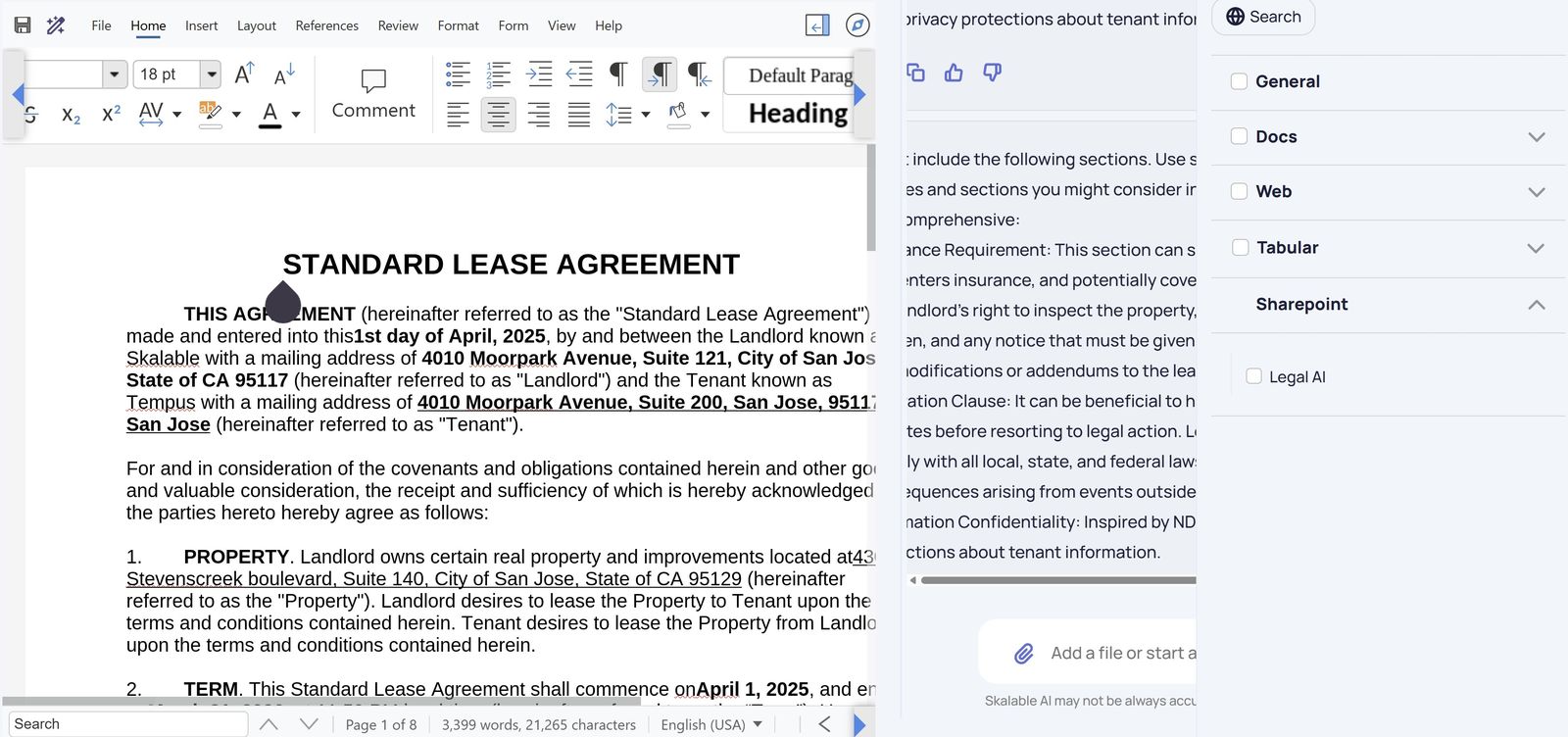
Lets a law firm ask questions of its own documents and draft new ones from its templates, in one place connected to where the files already live.
- Where the return comes from
- Time spent finding, reading and drafting documents.
- The problem
- Documents, templates and precedents spread across SharePoint and desktops, with drafting done from scratch or by copying.
- What the AI does
- Connects to the firm’s SharePoint, answers questions across its documents and uploaded files, creates drafts from the firm’s templates and helps rewrite or insert clauses on request, with version history.
- Who stays in charge
- Lawyers write and edit every draft themselves; drafts are stored in the firm’s own SharePoint.
- Runs on
- Skalable AI with Microsoft SharePoint
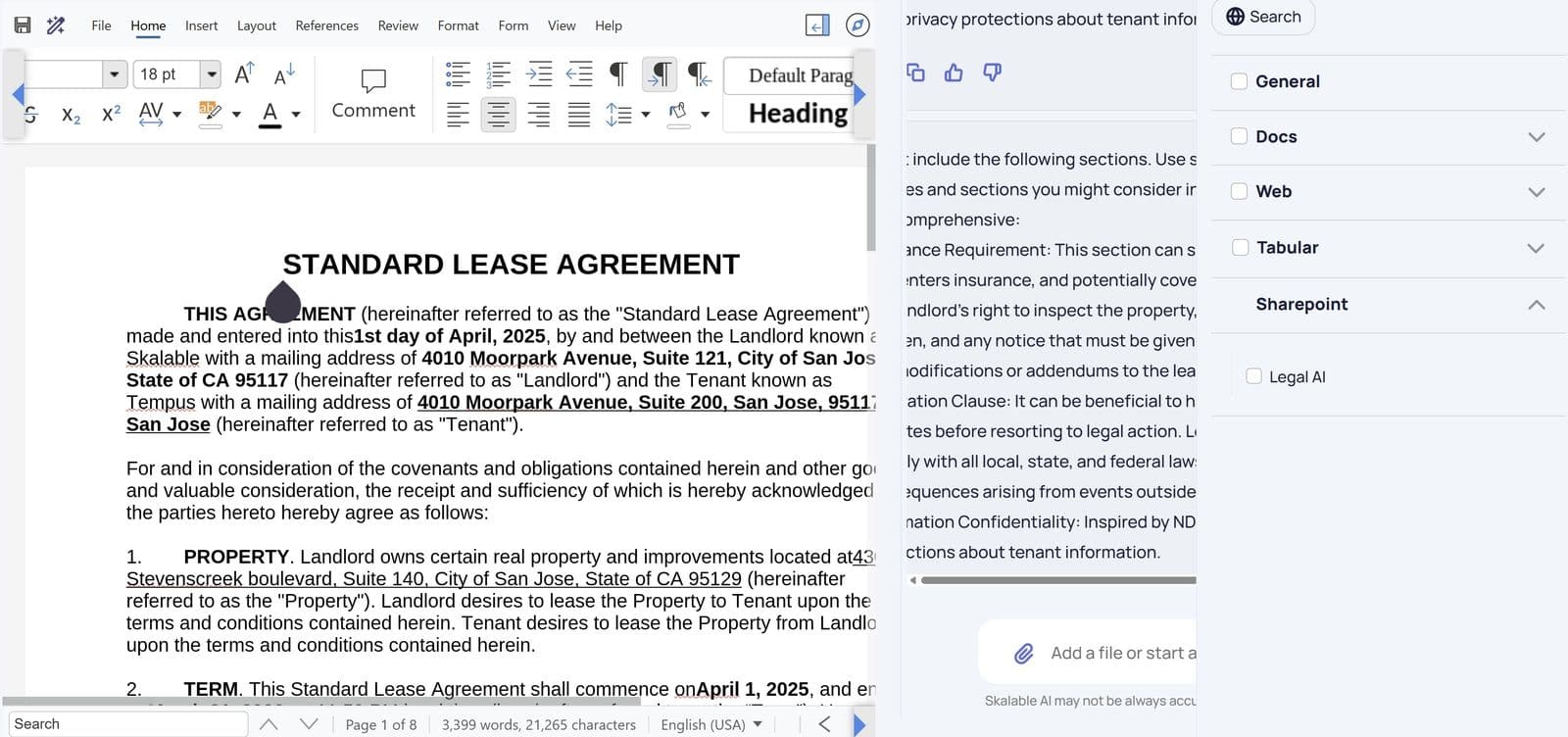
Drafting a lease from a template, with SharePoint as a data source (Skalable AI, 2025). - Property management · USA PropertiesProof of concept · 2024
Resident file sorting
Splits large scanned resident files into the separate documents a property team needs, named and ready to file.
- Where the return comes from
- Time spent splitting, naming and filing resident paperwork by hand.
- The problem
- Years of resident files scanned as single bundles: leases, rental applications and move-in checklists mixed together.
- What the AI does
- Finds the latest lease, each adult’s rental application and the move-in checklist in each bundle, and saves them as separate files named to the company’s convention.
- Who stays in charge
- Staff accept each result, or correct the pages, before anything is filed.
- Runs on
- Skalable AI with Microsoft SharePoint
Pilot acceptance targets80% accuracy, and user ratings above 3 out of 5, agreed with the client before the pilot. Pilot results are not published yet.
People and adoption
Helping staff use the business system with confidence
- Dynamics 365 usersAvailable for demo
Guided navigation by chat or voice
Staff ask how to do something in the business system, by typing or speaking, and it walks them there step by step.
- Where the return comes from
- Time new and occasional users spend finding the right page and steps.
- The problem
- New and occasional users lose time finding the right page and steps in Dynamics 365.
- What the AI does
- Answers a question in plain words and guides the user step by step to the right page, then explains it.
- Who stays in charge
- The user chooses records, amounts and decisions; the Assistant never makes those choices.
- Runs on
- Dynamics 365 Finance & Operations
Your workflow next
Tell us what comes in, who handles it and where the time goes. A specialist replies within one business day, whatever your industry, and you do not need an ERP to ask.
Finance team on Dynamics 365 or NetSuite? The Finance AI Assessment finds where AI can reduce manual work, in about two to three weeks for a fixed fee.
How we build AI
The same principles in every use case
Rules do the filtering and the critical checks, AI handles the judgment calls it is good at, people decide the exceptions and approvals your policy requires, and every step leaves a record. We agree what success looks like before we build, and measure against the starting point.
Have a workflow in mind?
Tell us what your team does by hand today. We reply within one business day.