Modern Workplace
Behind the Scenes with Copilot for Microsoft 365: The Structure of Smart Assistance
Skalable Technologies2 min read
Written a while ago. Product features, licensing and pricing may have changed since. Ask us for the current picture.
The Copilot for Microsoft 365 architecture can be explained as a system designed to assist users in creating content and performing tasks within Microsoft 365 applications like Word, Teams, and PowerPoint.
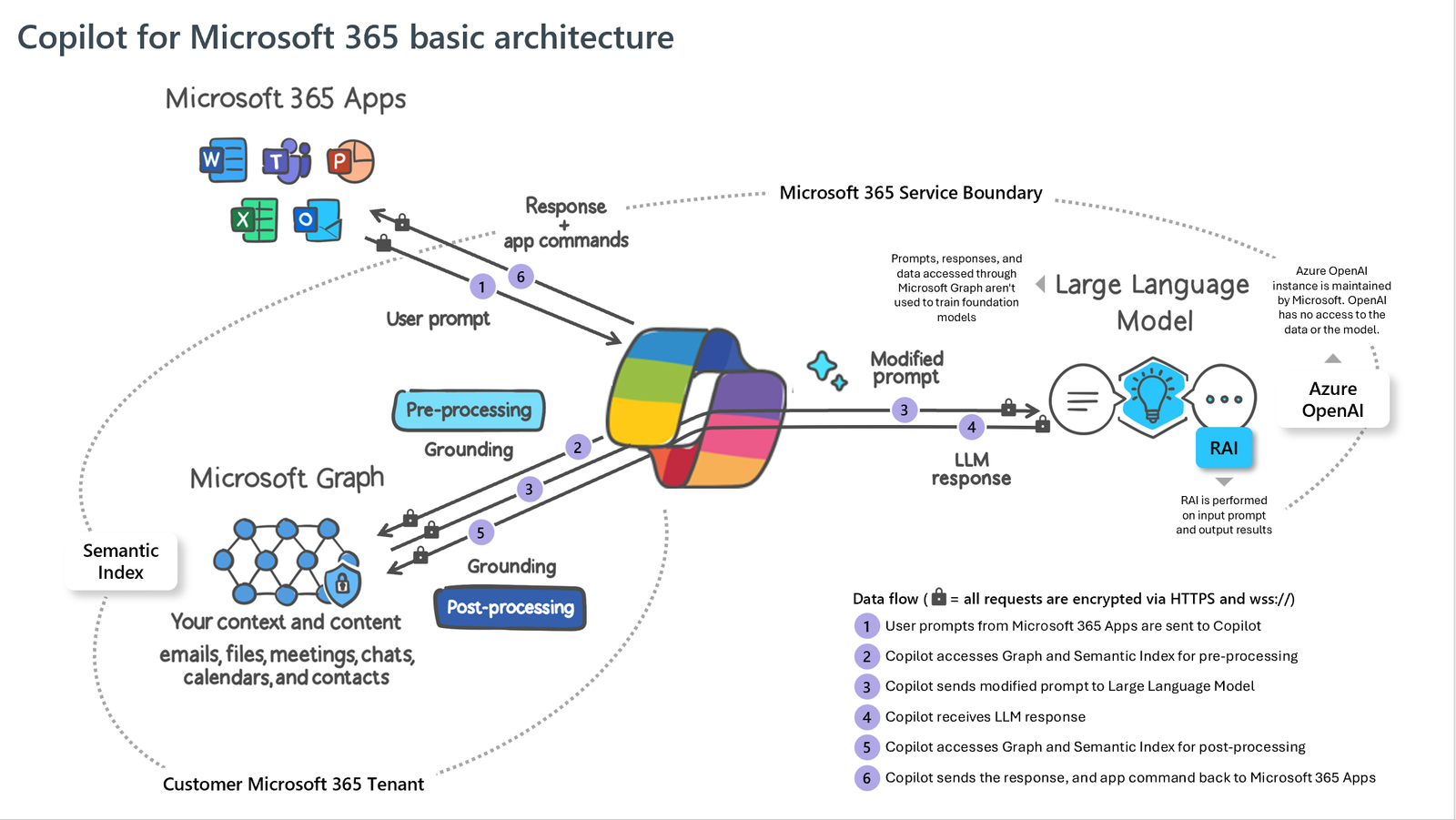
Here's a simplified breakdown of how it works:
- Input: It starts when a user types a prompt into one of the Microsoft 365 apps. This could be a request for information or a command to perform a specific task.
- Pre-Processing (Grounding): Once the prompt is received, Copilot begins to make it more specific through a process called grounding. Grounding involves consulting Microsoft Graph, which contains a semantic index of the user's data across the Microsoft 365 suite. This includes emails, files, meetings, chats, calendars, and contacts. Copilot uses this data to tailor the prompt so the response will be relevant to the user's specific context and task. The data Copilot uses is limited to what the user is already allowed to see based on their role in the organization.
- Modification and LLM Processing: After grounding, the prompt is modified as needed and sent to a Large Language Model (LLM). The LLM processes the prompt and generates a response. This response is informed by the user's data as well as additional information from knowledge bases or other inputs.
- Post-Processing: The response from the LLM is not final. It undergoes post-processing, which includes further grounding, responsible AI checks, and reviews for security, compliance, and privacy. Copilot also generates commands that can be executed within the Microsoft 365 apps.
- Output: Finally, Copilot sends the processed response and commands back to the Microsoft 365 app. The user can then review and interact with the suggestions provided.
Throughout this process, responsible AI (RAI) is involved to ensure that the output is ethical and aligns with compliance standards. Additionally, all communications with the LLM, which is hosted on Azure OpenAI, are encrypted, and Microsoft maintains the AI instance without direct access to the data.
In essence, Copilot for Microsoft 365 integrates tightly with the Microsoft ecosystem, leveraging organizational data to offer personalized assistance while maintaining privacy and security standards. It's like having an intelligent assistant that understands your work context and helps you be more productive within your Microsoft apps.
Next Steps
Ready to revolutionize your organization's productivity with Microsoft Copilot? Discover how Skalable Technologies can unlock the full potential of your Microsoft 365 suite with our expert guidance and support. Don’t let your business miss out on the transformative power of AI. to elevate your work to new heights.